AI base review for Clash of Clans
Send a screenshot of an enemy base and @CoC_topbot (interface in Russian) tells you how to attack: weak spots, likely traps and a plan.
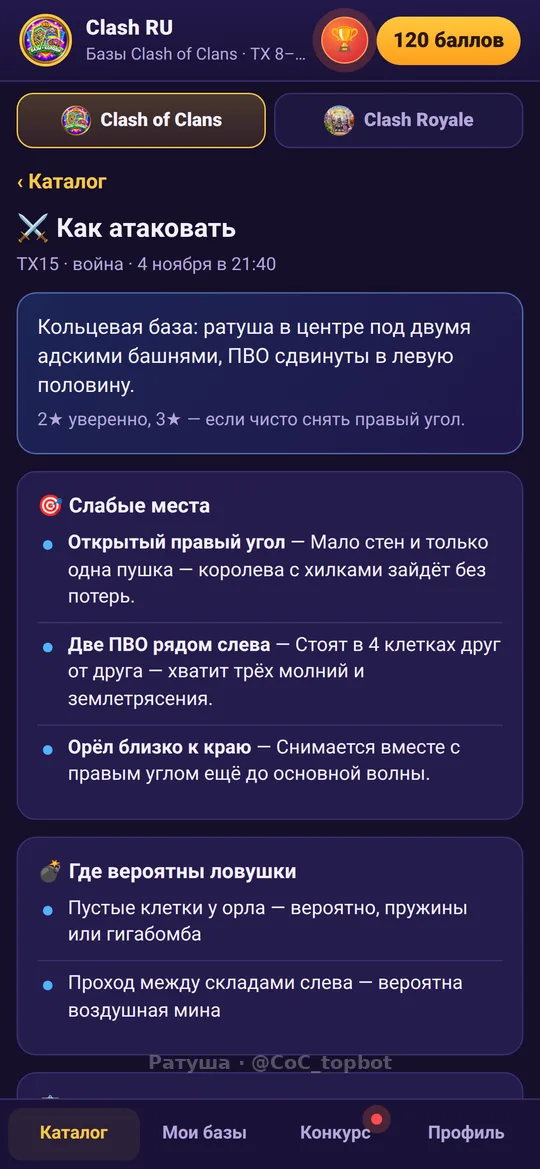
What the review shows
It does not replace scouting, but it saves time before the attack.
- Weak spots: open corners and thin sides
- Likely traps: empty tiles and suspicious areas
- An attack plan: where to enter and in what order
- A confidence estimate for two and three stars
How to get a review
Everything stays in Telegram.
- Open @CoC_topbot and the AI review section
- Upload a screenshot of the whole base, from your phone or by dragging a file on desktop
- Wait for the answer: weak spots and a plan
- Compare with your scouting and pick an army from the catalog
Tips for a precise review
The better the screenshot, the more useful the answer.
- Capture the whole base so all sides are visible
- Do not crop the edges or cover buildings
- Use a clean shot without extra windows
- Review your own base too, to find the holes
FAQ
Does the AI review cost money?
Some reviews are free, for example for inviting friends. The rest unlock with points. Terms are shown in the bot.
Does it work for any Town Hall?
Yes, the key is a clear screenshot of the whole base.
Can I review my own base?
Yes, it is a good way to find holes in your defense.
Is it an exact prediction?
No. It points to likely weak spots, but the attack decision is yours.
More pages
Clash RU community
Clash of Clans chat · Clash Royale chat · News · Find a clan · Chat games · Games and heroes: commands · Chat energy · TH13 bases · TH14 bases · TH15 bases · TH16 bases · TH17 bases · TH18 bases · Armies · AI base review · Clash Royale decks